Unlocking Unstructured Data: How to Use AWS S3 PDFs in Salesforce Agentforce Agents?
Introduction
In the era of Generative AI, enterprise intelligence is often locked away in unstructured formats like PDF documents. For Technical Architects, Developers, and Admins, the challenge isn’t just storing these files—it’s making them accessible to your AI agents.
This guide provides a technical walkthrough on how to bridge the gap between AWS S3 storage and Salesforce Agentforce. We will cover how to ingest PDF data into Salesforce Data Cloud (Data 360), create a custom retriever, and empower your Agentforce Agent to answer customer questions using that specific knowledge.
Step 1: Ingest Data into Salesforce Data 360 (Data Cloud)
The first crucial step is to ingest, chunk, and index your PDF files. We will utilize the S3 File Notification method to keep Data Cloud in sync with your AWS S3 bucket.
Kindly ingest data into Salesforce Data 360(Data Cloud). You can refer the following link for reference:
Note:
Make sure you create a custom retriever.
Step 2: Create Agentforce Data Library
Now that the retriever is active, we must expose it to the Agentforce ecosystem.
- Navigate to Agent Builder or Einstein Copilot setup.
- Go to the Library or Data tab.
- Click New to create a new Library entry.
- Select the Custom Retriever you created in Step 2.
- Give it a clear name (e.g., “S3 PDF Knowledge Base”) and description to ensure the Agent understands when to use it.
Step 3: Configure Agentforce Agent with Knowledge
The final step is connecting this library to your Agent’s conversational topics.
- Open your Agentforce Agent in the Builder.
- Navigate to Topics.
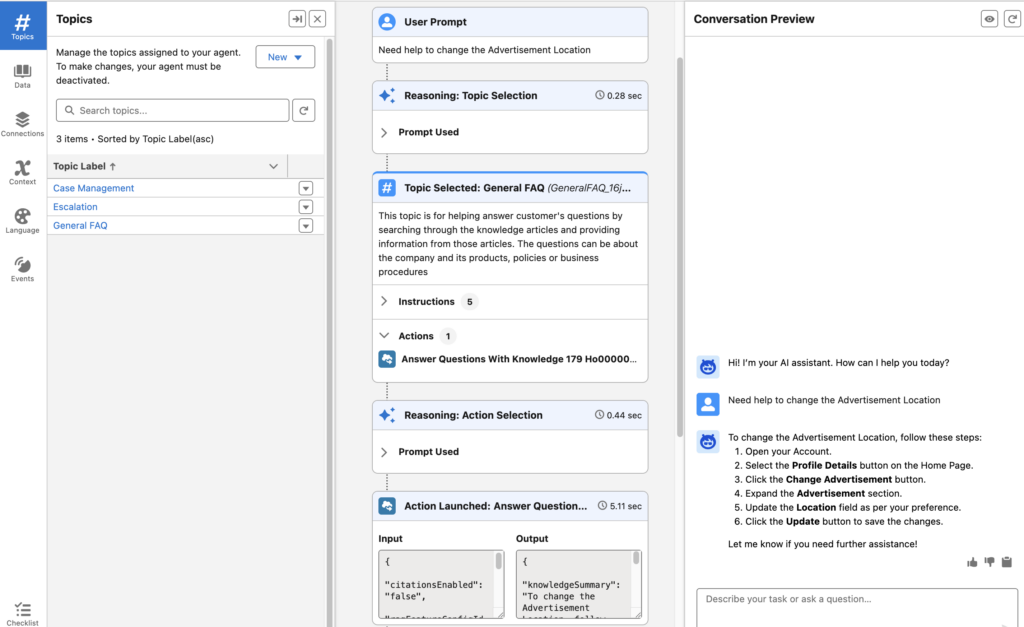
- Add the General FAQ standard topic (or “Answer Questions with Knowledge”).
- In the agent configuration, ensure it is linked to your Agentforce Data Library.
- Note: This allows the “Answer Questions with Knowledge” action to query your S3 PDF contents dynamically when a user asks a relevant question.
- Test your Agent: Use the simulator to ask a question contained within one of your uploaded PDFs. The Agent should retrieve the chunked data and generate a coherent response.