How to Set Up Salesforce Help Agent: A Step-by-Step Technical Guide
Setting up AI agents in enterprise environments often comes with steep overhead—navigating complex orchestration frameworks, fine-tuning retrieval pipelines, and configuring API gateways. With Salesforce Help Agent, Salesforce streamlines autonomous customer and employee support natively within the platform.
Whether you are a Salesforce Architect designing support automation or an Admin tasked with rolling out autonomous AI capabilities, this guide walks through configuring the Help Agent directly within Setup while preserving your existing Knowledge base context.
Technical Prerequisites
Before navigating to the configuration steps, ensure your org meets these baseline environment requirements:
- Permissions: You must have the
Manage AgentsorSystem Administratorprofile enabled. - Knowledge Base: Ensure Salesforce Knowledge is active if you plan to ground your agent in existing internal documentation.
- Einstein Trust Layer: Verify that Einstein / AI services are enabled in your organization’s core settings.
Step-by-Step Implementation Guide
Follow these exact steps in your Salesforce org to initialize and launch your Help Agent.
1.Navigate to Setup:Step 1.
Log into your Salesforce environment and navigate to Salesforce Setup by clicking the gear icon in the top right corner.
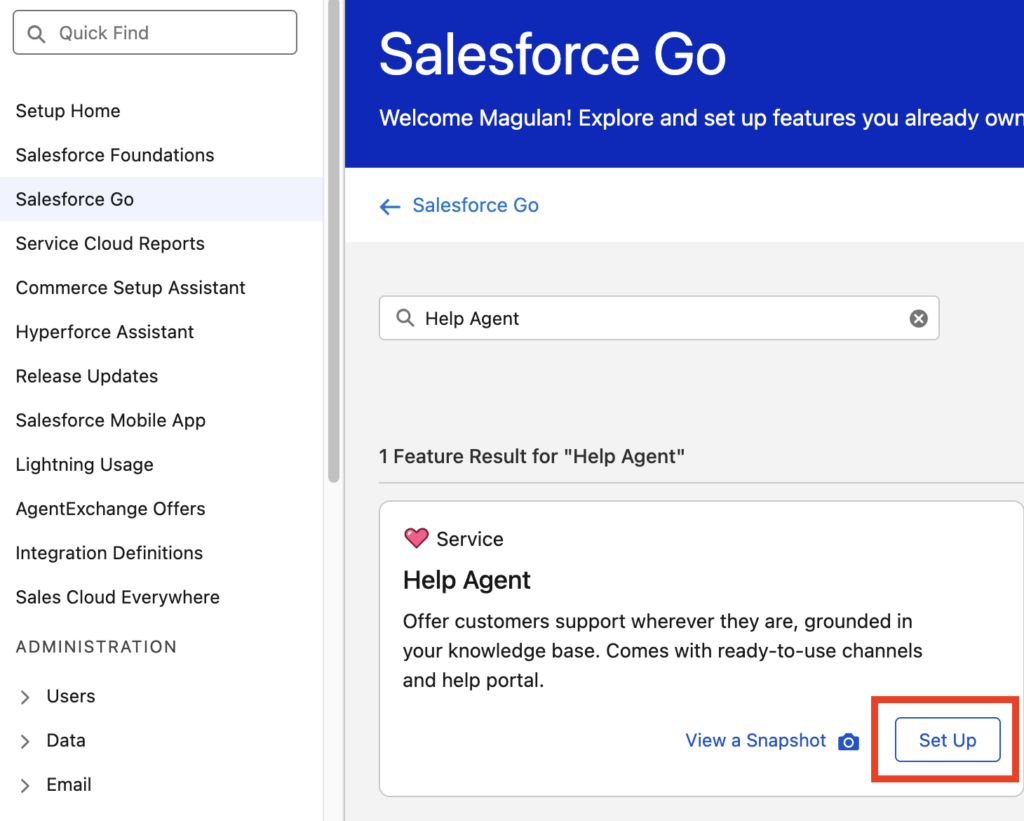
2.Access Help Agent Setup via Salesforce Go:Step 2.
Open Salesforce Go. In the Quick Find box, search for Help Agent and click Setup.
3.Initialize Setup:Step 3.
On the Help Agent landing page, click Get Started to begin the provisioning wizard.
4.Enable the Feature:Step 4.
Click Turn On to activate Help Agent capabilities across your Salesforce instance.
5.Initiate Agent Creation:Step 5.
In the Complete the Required Steps section, click Go to create the Help Agent instance.
6.Open Configuration Wizard:Step 6.
Click Get Started inside the Agent Configuration workspace.
7.Define Agent Identity & Greetings:Step 7.
Enter the Agent Name. Next, select the specific Agent instance and craft your Agent Welcome Greeting (e.g., “Hello! I’m your AI Support Assistant. How can I help you navigate our systems today?”).
8.Ground Agent in Data (Context Sources):Step 8.
Under Give Your Agent Context, select your grounding data sources. You can select Salesforce Knowledge articles and upload custom files (PDFs, process docs, technical specs) to supply RAG (Retrieval-Augmented Generation) context.
9.Channel Configuration & Testing:Step 9.
In the Add to Channels section, configure the specific communication channels (e.g., Experience Cloud, Messaging for In-App and Web) where your Help Agent will reside. Once linked, run dry runs directly in the built-in Preview console before deploying live.
Implementation Best Practices & Recommendations
To ensure optimal performance, low latency, and accurate retrieval from your Help Agent implementation, consider these architect-level guidelines:
1. Data Grounding & RAG Optimization
- Article Granularity: Break long, monolithic Salesforce Knowledge articles into structured, modular topics. The underlying vector retriever performs significantly better on tightly focused technical articles than multi-topic manuals.
- File Upload hygiene: When uploading files during Step 8, prefer clean PDF or text formats over heavily formatted image-based documents. Ensure key metadata and headers are clear.
2. Prompt & Greeting Design
- Set Clear Boundaries: Use the Welcome Greeting (Step 7) to set user expectations. Explicitly declare what topics the agent is optimized to solve (e.g., password resets, order tracking, tier-1 technical troubleshooting).
3. Deployment Safety & Channel Governance
- Iterative Testing in Preview: Always test edge cases in the Preview panel (Step 9) using real user queries before binding the agent to public or internal production channels.
- Fallback Paths: Configure graceful fallback rules so that when the Help Agent encounters low confidence scores, queries route seamlessly to human support representatives with full session context.
Choosing between the Agentforce Service Agent and the newly introduced Agentforce Help Agent comes down to speed-to-market, pricing structure, and how much customization your unique workflows require.
Here is how you can systematically determine which one to use for your specific use cases.
The Core Definitions
- Agentforce Service Agent: The foundational, platform-native AI agent built directly inside your Service Cloud environment. It is highly customizable, deeply integrated with your custom objects and flows, and typically billed via standard Salesforce consumption/licensing models.
- Agentforce Help Agent: A highly streamlined, “out-of-the-box” autonomous service agent package. It features guided setups, pre-built action libraries (like updating orders, scheduling appointments, and managing standard cases), and utilizes a Pay-Per-Resolution pricing model.
4 Keys to Deciding Which Agent to Use
1. Pricing & Commercial Model
- Choose Help Agent if: You want a clear “pay-for-performance” model. Because it operates on a pay-per-resolution model (around $2 per successful, end-to-end resolution), you are not billed if a customer escalates to a human rep or leaves negative feedback. This makes it incredibly easy to prove ROI to stakeholders for standard use cases.
- Choose Service Agent if: You have a massive, highly predictable volume of complex traffic where a custom enterprise contract or standard conversation/consumption licensing is more cost-effective than paying a flat rate per resolution.
2. Implementation Speed vs. Customization Depth
- Choose Help Agent if: You need a rapid deployment. Help Agent comes with pre-packaged workflow actions and a single-screen configuration. It is built to work “out of the box.”
- Choose Service Agent if: If your development heavily rely on intricate, proprietary Apex classes, complex Omni-Channel routing logic, highly specific custom object data, or multiple third-party API integrations (via MuleSoft or External Services) that go far beyond standard CRM workflows.
3. Channel Strategy
- Choose Help Agent if: You want immediate, omni-channel deployment (Web, Portal, Messaging, and Voice) handled seamlessly from a guided, unified setup screen on day one.
- Choose Service Agent if: You are executing a highly staggered, tailored rollout across niche digital channels and want absolute granular control over how the subagents (formerly topics) and prompt templates behave natively .
4. Complexity of the User Intent
- Choose Help Agent if: The user intents are straightforward transactions (e.g., “Where is my order?”, “Change my booking”, “How do I return this?”).
- Choose Service Agent if: The conversational design requires deep, multi-layered problem-solving where the agent acts as an advanced, assistive intelligence that needs custom-tailored ground rules and unique security/data permission structures.
Summary Decision Matrix
| Feature / Need | Agentforce Help Agent | Agentforce Service Agent |
| Pricing Model | Pay-Per-Resolution (Only pay for autonomous success) | Standard Consumption / Enterprise License |
| Setup Time | Days/Weeks (Guided setup, pre-built actions) | Weeks/Months (Configured from scratch in Agentforce Builder) |
| Best Use Case | Routine service inquiries, standard cases, FAQs | Highly complex, bespoke enterprise workflows |
| Integration | Standard CRM workflows (Orders, Cases, Appointments) | Custom objects, heavy Apex, complex external APIs |