How to Fix Agentforce Activation Error: “Agents are still being provisioned” in Salesforce
If you are a Salesforce Administrator, Developer, or Architect diving into the capabilities of Agentforce, you know that setting up autonomous AI agents can significantly streamline your org’s operations. However, during the initial setup and activation phase, you might hit a frustrating roadblock that prevents your agent from going live.
One of the most common provisioning hurdles is an activation exception that halts your progress. If you are staring at an error message telling you that agents are still being provisioned, you aren’t alone.
Here is a quick technical guide on why this happens and the exact steps to resolve it.
The Problem: Activation Exception
When attempting to activate your newly configured agent in Agentforce, you receive the following exact error message:
Exception:
“We can’t activate your agent because agents are still being provisioned for this org.”
This error typically occurs when the underlying AI, bot, and data infrastructure required by Agentforce has not been fully initialized or enabled within your Salesforce environment. Agentforce relies on a tightly integrated stack consisting of Einstein, Einstein Bots, and Data Cloud. If any of these dependencies are disabled or out of sync, the provisioning process will fail.
The Resolution: Step-by-Step Fix
To resolve this issue, you need to verify your org’s configuration and ensure all prerequisite services are active. Follow these steps in your Salesforce Setup menu:
Step 1: Enable Einstein
Agentforce requires the core Einstein generative AI features to be active.
- Navigate to Salesforce Setup.
- Search for and click on Einstein Setup.
- Ensure the toggle to turn on Einstein is Enabled.
Step 2: Enable Agentforce Agents
The specific Agentforce feature must be explicitly turned on for the org.
- In Salesforce Setup, search for Agentforce.
- Click on Agentforce agents.
- Switch the toggle to On.
Step 3: Enable Einstein Bots
Because Agentforce builds upon the conversational infrastructure of Salesforce, bots must be active.
- In Salesforce Setup, search for Einstein Bots.
- Ensure the feature is turned On.
Step 4: Verify Data Cloud (Data 360) Settings
Agentforce relies heavily on Data Cloud for grounding and context.
- Navigate to Data Cloud Setup Home.
- Verify: Is Data 360 (Data Cloud) enabled for Data Library and other Data 360 related features? Ensure all necessary data infrastructure features are active.
Step 5: The Final Reset
If you have verified that all the above settings are enabled but you are still seeing the error, you need to force the provisioning cycle to refresh.
- Go back to Salesforce Setup > Agentforce agents.
- Disable Agentforce.
- Wait a few moments, and then Enable Agentforce again.
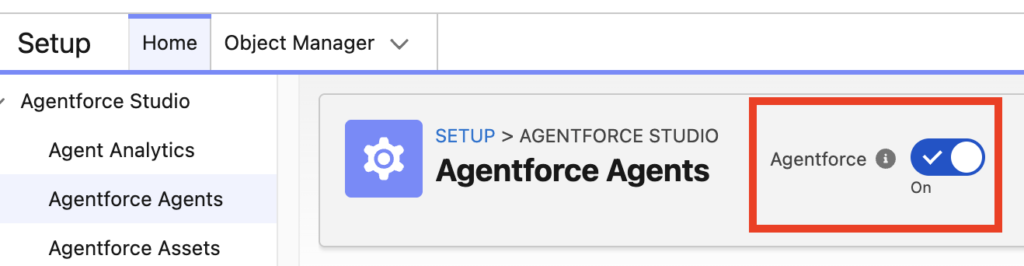
Toggling the feature off and on forces the backend to re-evaluate your Salesforce org’s configuration, often clearing the “still being provisioned” backlog.
Salesforce Help Article for reference:
https://help.salesforce.com/s/articleView?id=005104795&type=1