Boost Your Efficiency: How to Manage Agentforce Recommendations (Show or Hide)
Have you ever noticed those helpful suggestions popping up in your Agentforce workspace? They’re designed to give you a leg up, but sometimes you might want to adjust how and when they appear. This quick guide will walk you through how to manage Agentforce’s dynamic recommendations, so you can tailor your workflow for maximum efficiency.
What Are Agentforce Recommendations?
Agentforce isn’t just about static keywords. Its recommendation engine is incredibly smart. It analyzes a combination of factors to provide the most relevant suggestions possible:
- Conversation History: The system looks at the entire flow of the conversation, not just the last message. This allows it to understand the full context and provide recommendations that are truly useful.
- Page Topic: Recommendations are also tied to the specific page or topic you’re working on, ensuring the suggestions are always on-point and relevant to the task at hand.
- Dynamic Generation: These aren’t pre-canned responses. They are dynamically generated in real-time based on the ongoing conversation, making them a powerful tool for agents.
Why Would You Want to Hide Recommendations?
While these recommendations are designed to be a great help, there might be times when you want to hide them. Perhaps you’re an experienced agent who prefers to rely on your own knowledge, or maybe you’re working on a highly specific task where the suggestions might be distracting. Giving you the control to show or hide them is all about personalizing your workflow to best suit your needs.
How to Show or Hide Recommendations
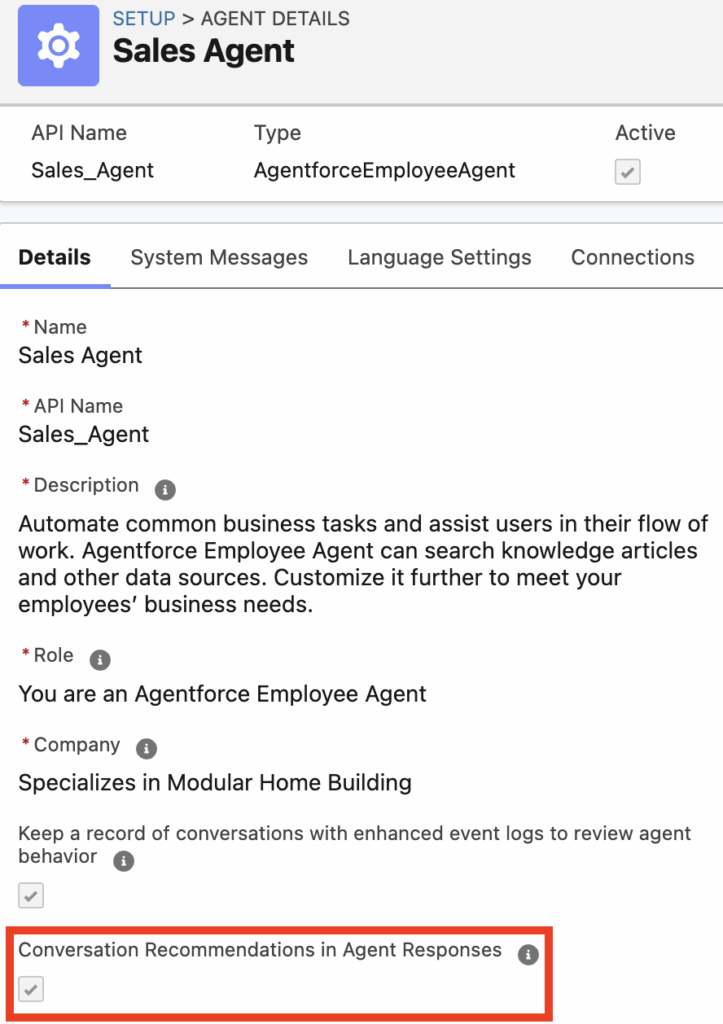
Managing this feature is simple and gives you full control. The key setting you need to be aware of is “Conversation Recommendations in Agent Responses.”
- To Show Recommendations: Ensure that the “Conversation Recommendations in Agent Responses” setting is enabled. When this is turned on, Agentforce will analyze the conversation and the page to display its helpful suggestions. This is the ideal setting for new agents or for complex conversations where a little extra guidance can go a long way.
- To Hide Recommendations: If you prefer a cleaner interface or want to work without the suggestions, simply disable the “Conversation Recommendations in Agent Responses” setting. With this feature turned off, the recommendations will not appear, giving you a minimalist workspace focused solely on the conversation.
Take Control of Your Workflow
Agentforce’s dynamic recommendations are a powerful feature designed to make your job easier and more efficient. By knowing how to enable or disable them, you can take control of your workspace and customize it to fit your personal workflow. Whether you choose to leverage the full power of the recommendations or prefer a streamlined, minimalist view, the choice is yours.
Ready to optimize your Agentforce experience? Adjust your settings today and discover the perfect workflow for you!
Vote for the following idea to start customizing it
https://ideas.salesforce.com/s/idea/a0BHp000016KkfiMAC/custom-recommendation-card-in-agentforce