🚀 How to Find Salesforce Knowledge Article Data Categories with SOQL
Working with Salesforce Knowledge is a powerful way to manage your organization’s information, but finding the exact data you need for reports or integrations can sometimes be a puzzle.
A common challenge is figuring out which Data Categories are assigned to a specific Knowledge Article. If you look at the Knowledge__kav object (the article version) in a SOQL query, you won’t find the category information directly.
So, how do you bridge this gap? The secret lies in a “junction” object: knowledge__DataCategorySelection.
The SOQL Query You Need
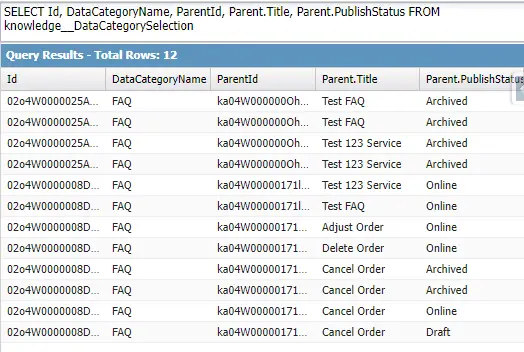
To find Salesforce Knowledge Article Data Categories assignments, we have to query the knowledge__DataCategorySelection object/entity. This object holds the link between the article version and the specific data category it’s assigned to.
Here is the foundational SOQL query to get this information:
SELECT Id, DataCategoryName,
ParentId, Parent.Title, Parent.PublishStatus
FROM knowledge__DataCategorySelection
Breaking Down the Query
Let’s look at what each selected field tells us:
Id: This is the unique ID of the data category assignment record itself.DataCategoryName: This is the field you’re likely looking for—the developer name of the data category (e.g.,Products_Salesforce).ParentId: This is the crucial link. It’s theIdof theKnowledge__kavrecord (the specific article version) that the category is assigned to.Parent.Title: By using relationship traversal (Parent.), we can pull in the Title of the article version, making our query results much easier to read.Parent.PublishStatus: This is also pulled from the article version and is very useful for seeing if the category is assigned to aDraft,Online, orArchivedversion.
Code Recommendations & Best Practices
As requested, here are the best practices for using the code snippet above in a real-world scenario.
The provided query is a great start, but you should almost never run it without filters.
Running the query as-is will return every single category assignment for every single article version in your Salesforce org. This can be a massive amount of data and is inefficient.
Here are the best practices to make this query practical:
- Always Use a
WHEREClause- To find categories for one specific article: Filter by the
ParentId(which is theKnowledge__kavID).SQL/* Find all categories for a single article version */ SELECT DataCategoryName FROM knowledge__DataCategorySelection WHERE ParentId = 'ka05x000000ABCD' /* <-- Your Article Version ID */ - To find all articles in one specific category: Filter by the
DataCategoryName.SQL/* Find all published articles in a specific category */ SELECT Parent.Title, Parent.ArticleNumber FROM knowledge__DataCategorySelection WHERE DataCategoryName = 'YourCategoryName' AND Parent.PublishStatus = 'Online'
- To find categories for one specific article: Filter by the
- Remember ParentId = Article Version (Knowledge__kav)A common mistake is trying to filter using the Knowledge__ka (Article) ID. The knowledge__DataCategorySelection object is linked specifically to the article version (Knowledge__kav). This is important because a new Draft version of an article might have different category assignments than the Online version.
- Be Aware of Governor LimitsIf you are using this query inside Apex, be mindful of governor limits. If you must query many of these records, ensure your query is selective (using WHERE clauses on indexed fields) or consider using a SOQL FOR loop to process records in batches.
Conclusion:
To find Salesforce Knowledge Article Data Categories Assignment, we have to query the knowledge__DataCategorySelection object/entity.
SOQL:
SELECT Id, DataCategoryName,
ParentId, Parent.Title, Parent.PublishStatus
FROM knowledge__DataCategorySelection