Master Salesforce Agentforce IT Service: Setup Guide & Best Practices
As enterprise IT environments become increasingly complex, technical teams—from Admins and Developers to Architects—need robust tools to streamline service requests. Enter Salesforce Agentforce IT Service.
If you are looking to architect a more efficient IT helpdesk and automate repetitive ticketing tasks, Agentforce is designed to be your IT service management (ITSM) solution for the modern workplace. Leveraging intelligent automation and a unified workspace, it allows organizations to standardize how they deliver and support services across every channel.
In this technical guide, we will walk through the core setup process for enabling Agentforce IT Service in your Salesforce org, integrating it with Slack, and outline key best practices to ensure a secure and scalable deployment.
What is Salesforce Agentforce IT Service?
Agentforce IT Service goes beyond traditional ticketing. It acts as an intelligent ITSM layer within your Salesforce ecosystem. By deploying specialized AI-driven agents, you can significantly reduce the manual overhead for your IT staff while providing employees with instant, automated resolutions to common technical issues.
The architecture relies on two primary agents:
- IT Service Employee Agent: Faces the end-user, handling inbound requests, troubleshooting, and self-service routing.
- IT Service Fulfiller Agent: Assists the IT staff (fulfillers) with backend automation, ticket classification, and resolution steps.
Step-by-Step Setup Instructions
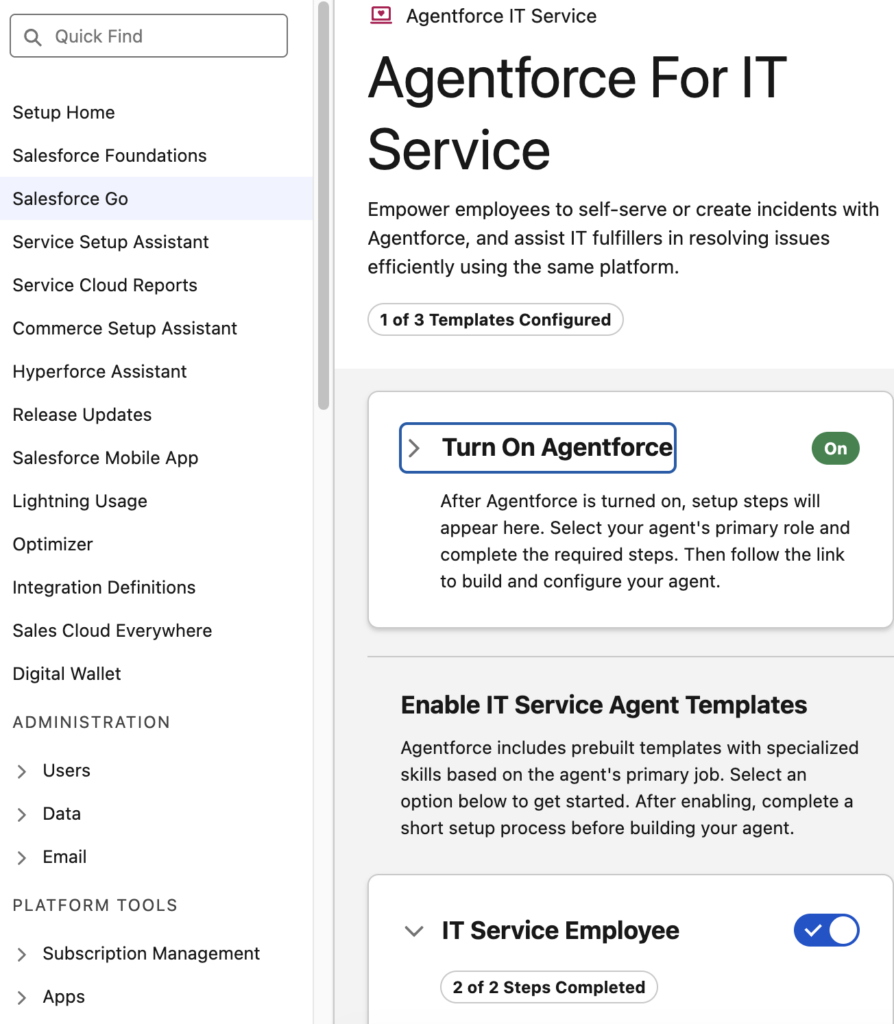
To get Agentforce IT Service up and running, follow these exact configuration steps within your Salesforce environment:
- Go to Salesforce Setup.
- Select Salesforce Go.
- Search for “Agentforce IT Service” and select it.(Path for reference:
/lightning/setup/page/feature/service-cloud-agentforce-for-itsm/home) - Complete setting up the IT Service Employee Agent and IT Service Fulfiller Agent.
- Use Permission Set or Profile to grant access to the IT Service Employee and IT Service Fulfiller Agentforce Agents to the users.
Expanding the Unified Workspace: Slack Integration
In a modern DevOps and IT environment, meeting users where they already work is critical for adoption. Users do not always want to log into a portal to submit a ticket.
Users can use Slack to invoke the Agentforce Agents directly. By configuring the Agentforce Agents within your corporate Slack workspace, you enable seamless, chat-based ITSM workflows where employees can interact with the Employee Agent to instantly log issues, check ticket statuses, or trigger automated workflows.
Technical Recommendations & Best Practices
As requested, here are the architectural and administrative best practices to consider when deploying the setup steps outlined above:
1. Principle of Least Privilege for Permission Sets (Ref: Step 5)
When granting access to the agents using Permission Sets or Profiles, avoid assigning these permissions broadly via base profiles. Instead, create dedicated Permission Set Groups. For instance, group the “IT Service Employee Agent” permission with basic community/internal user access, and strictly reserve the “IT Service Fulfiller Agent” permissions for your IT support staff and System Administrators.
2. Sandbox Testing First (Ref: Steps 1-4)
Because Agentforce introduces intelligent automation that interacts with your existing case routing, always perform this setup in a Full or Partial Copy Sandbox first. Validate that the Fulfiller Agent does not conflict with existing Apex triggers, Flow automations, or Omni-Channel routing rules already established in your Service Cloud environment.
3. Securing the Slack Integration
When configuring the agents in Slack, ensure that your Slack integration is mapped correctly to your Salesforce user records. Use distinct Slack channels (e.g., #it-helpdesk) specifically mapped to Agentforce so the bot does not inadvertently monitor or ingest data from private or unrelated channels.
4. Monitor and Iterate
Once the Employee and Fulfiller agents are active, monitor their resolution rates and interaction logs. The effectiveness of “intelligent automation” relies on continuous refinement. Regularly review the conversations and paths taken by the agents to identify gaps in your org’s Knowledge Base articles or missing automation flows.
If you are unable to see Slack in Agentforce Builder connections tab, install/upgrade the following package:
https://login.salesforce.com/packaging/installPackage.apexp?p0=04tKX000000cHXG
Check this Article for more info:
https://help.salesforce.com/s/articleView?id=005299191&type=1
Use External App option from Messaging connection in the Connections.
Help Article:
https://help.salesforce.com/s/articleView?id=service.it_srvcs_parent.htm&type=5
Trailhead Resources:
https://trailhead.salesforce.com/content/learn/modules/agentic-it-service-quick-look/deliver-excellent-it-service-with-agentic-ai
https://trailhead.salesforce.com/content/learn/modules/agentforce-it-service-basics