A Technical Guide to Salesforce Agentforce Model Selection
Learn how to configure and optimize Salesforce Agentforce Model Selection. A technical guide for Salesforce Admins, Developers, and Architects on choosing between AWS-Hosted and Salesforce Default models.
Introduction to Agentforce Model Selection
As Salesforce continues to embed artificial intelligence deep into its CRM capabilities, technical professionals—including Admins, Developers, and Architects—need granular control over how these AI models operate. Salesforce Agentforce empowers teams to build and deploy intelligent, autonomous agents that assist employees with key business tasks across Salesforce and Slack.
However, deploying an AI agent isn’t a one-size-fits-all scenario. Depending on your organization’s compliance requirements, existing cloud infrastructure, and specific generative AI use cases, you may need to pivot away from out-of-the-box configurations. This is where Agentforce Model Selection becomes critical.
In this guide, we will walk through exactly how to access these settings and break down the options available to your org.
How to Configure Your Agentforce Model?
Configuring the underlying model for your Agentforce setup is a straightforward process, but it sits within the broader Einstein monitoring architecture. To update your model, follow these exact steps:
Go to Salesforce Setup and select Einstein Audit, Analytics, and Monitoring Setup.
Change the model in Select the Model Option for Agentforce.
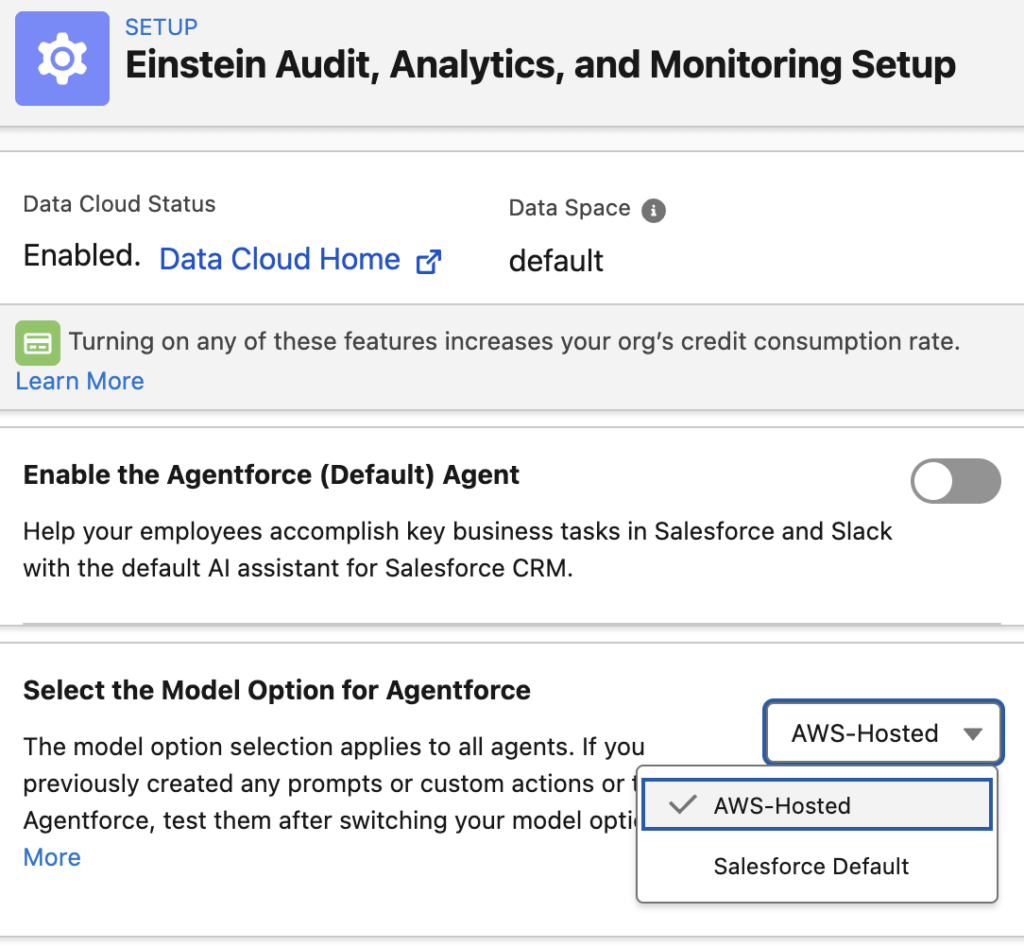
Understanding the Model Options
When you navigate to the Select the Model Option for Agentforce dropdown, you will typically see two primary choices:
- Salesforce Default: This utilizes the standard, out-of-the-box Large Language Models (LLMs) managed and optimized directly by Salesforce via the Einstein Trust Layer. This is ideal for most standard CRM use cases where zero-configuration deployment is preferred.
- AWS-Hosted: This option allows orgs to route their Agentforce capabilities through AWS-hosted models (often leveraging Amazon Bedrock). This is highly favored by Architects and Engineers operating in strictly regulated industries, or those who already maintain a heavy AWS infrastructure footprint and require specific data residency or custom model guardrails.
Key Technical Considerations
When modifying your Agentforce model selection, keep the following technical impacts in mind:
1. Universal Application
The model option you select here acts as a global setting. It applies to all agents operating within your Salesforce environment. You currently cannot mix-and-match standard Salesforce Default models with AWS-Hosted models on a per-agent basis from this specific setup menu.
Recommendations & Best Practices
If you are planning to switch models or implement Agentforce for the first time, adhere to these best practices:
- Re-Test All Prompts: If you previously created any prompts or custom actions for Agentforce using the Salesforce Default model, you must thoroughly test them after switching to the AWS-Hosted model (and vice versa). Different LLMs interpret instructions and context differently; a prompt that works perfectly on one model may hallucinate or fail on another.
- Sandbox First: Never change the global Agentforce model in a production environment without validating the output, performance latency, and integration stability in a Full Copy Sandbox first.
https://help.salesforce.com/s/articleView?id=ai.agent_setup_select_model_provider.htm&type=5