🌟 Introduction: Why You Should Make the Switch to Enhanced Chat v2
- Hook: Is your support team ready for the next generation of digital engagement in Salesforce? Enhanced Chat v2 is a crucial update for anyone using Embedded Service for chat.
- Key Benefits (Briefly Mention from Search Results): Enhanced Chat v2 is part of the broader Enhanced Conversation Platform, which offers a more consistent experience across channels, better support for reusable content (like messaging components), and a foundation for advanced features like AI agents and Omni-Channel Flow routing.
- The Goal: This guide provides a simple, six-step process to quickly and correctly switch your existing Embedded Service Deployment to the Enhanced Chat v2 framework.
⚙️ The Step-by-Step Guide: How to Switch to Enhanced Chat v2
Transitioning to v2 is surprisingly straightforward. Follow these steps precisely to ensure a smooth switch for your organization.
Step 1: Navigate to Setup
- Log in to your Salesforce Org and click the Setup gear icon in the top right.
- In the Quick Find box, search for “Embedded Service”.
Step 2: Open Your Deployment
- Under the “Embedded Service” result, click on Embedded Service Deployments.
- Select the specific deployment you want to update (e.g., your primary website chat configuration).
Step 3: Initiate the Switch to V2
- Within the Embedded Service Deployment settings page, look for the “Switch to V2” button and click it.
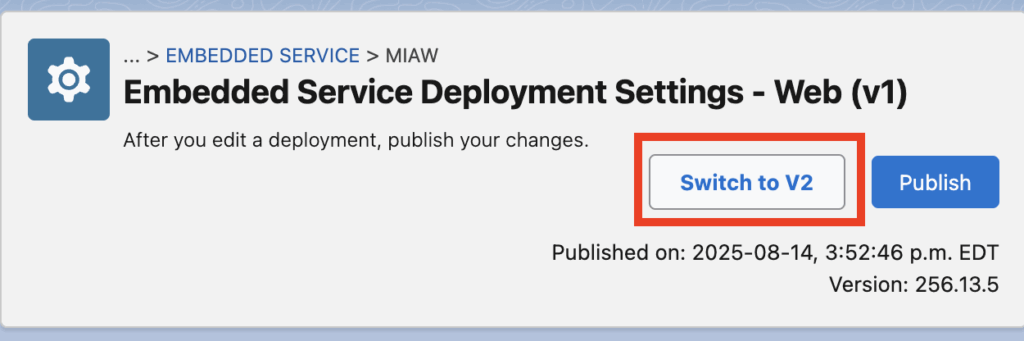
Step 4: Wait for the Transition
- Important Note: The switch is not instant. Salesforce will perform the necessary updates in the background. Kindly wait for the switch to complete. This process may take a few moments.
Step 5: Verify the Switch Success
- After waiting, refresh the page in your browser.
- To confirm the successful transition, you should now see a “Switch to V1” button (meaning you are currently on V2) and the Published On date should reflect the latest date and time of the switch.
Step 6: Test the New Enhanced Web Chat Experience
- To truly experience the improvements, click the “Test Enhanced Web Chat” button located on the Embedded Service Deployment page.
- This will launch a new browser window, allowing you to interact with the new chat widget and verify all your customizations and routing are working correctly on the v2 platform.
✅ Conclusion: What’s Next After Switching?
- Congratulations! Your deployment is now running on the powerful Enhanced Chat v2 framework.
- This transition is key to unlocking future Service Cloud innovations and optimizing your customer service digital channels.
- Actionable Next Step: Now that you’ve switched, explore the deeper customization options, such as Omni-Channel Flows for advanced routing, and the new component builder capabilities exclusive to the enhanced platform.
Salesforce Article:
https://help.salesforce.com/s/articleView?id=service.enhanced_chat_v2_setup.htm&type=5