Step-by-Step Guide: Migrate Salesforce Agentforce (Default) to an Employee Agent Before the June 2025 Deadline
Introduction: The Clock is Ticking for Salesforce Agentforce (Default)
Attention Salesforce Administrators and Developers! A significant platform evolution is on the horizon. Starting June 17, 2025, Salesforce will cease providing new features and enhancements for the legacy Agentforce (Default) agent type.
While existing Agentforce (Default) agents will continue to function, they will be frozen in time, missing out on all future innovation. Furthermore, this agent type will no longer be available for creation in new Salesforce environments.
To ensure your organization benefits from continued support, security updates, and feature enhancements, Salesforce strongly recommends migrating to the modern Agentforce Employee Agent.
This technical guide will walk you through the “why” and, more importantly, the simple, Salesforce-provided “how” to make this crucial transition smoothly and efficiently.
Why You Must Migrate from Agentforce (Default)
Migrating isn’t just a recommendation; it’s a critical step in future-proofing your Salesforce instance. Here’s why you should prioritize this task:
- Access to Future Enhancements: All new development, performance improvements, and feature rollouts will be exclusive to the Agentforce Employee Agent type. Sticking with the default agent means your service capabilities will become outdated.
- Continued Salesforce Support: As Salesforce focuses its resources on the Employee Agent, support for the legacy type will inevitably decline. Proactive migration ensures you remain on a fully supported path.
- Platform Alignment: The Employee Agent is the new standard. Aligning with Salesforce’s recommended architecture ensures better compatibility with other platform features and future updates.
- Simplicity of Migration: Salesforce has created a direct, wizard-based path to perform this conversion. It’s a low-effort task with a high-value return.
How to Migrate: A 5-Step Process
Salesforce has made this a straightforward process that requires no coding or complex data manipulation. The platform handles the heavy lifting of transferring your existing configurations to the new agent type.
Follow these exact steps to complete the migration.
Step 1: Go to Agentforce Agents in Salesforce Setup
Navigate to the heart of your Salesforce environment.
- Click the Gear icon in the top right corner and select Setup.
- In the ‘Quick Find’ box on the left, type
Agentforce Agents. - Click on the Agentforce Agents link under the ‘Agentforce’ section.
Step 2: Start the Migration Process
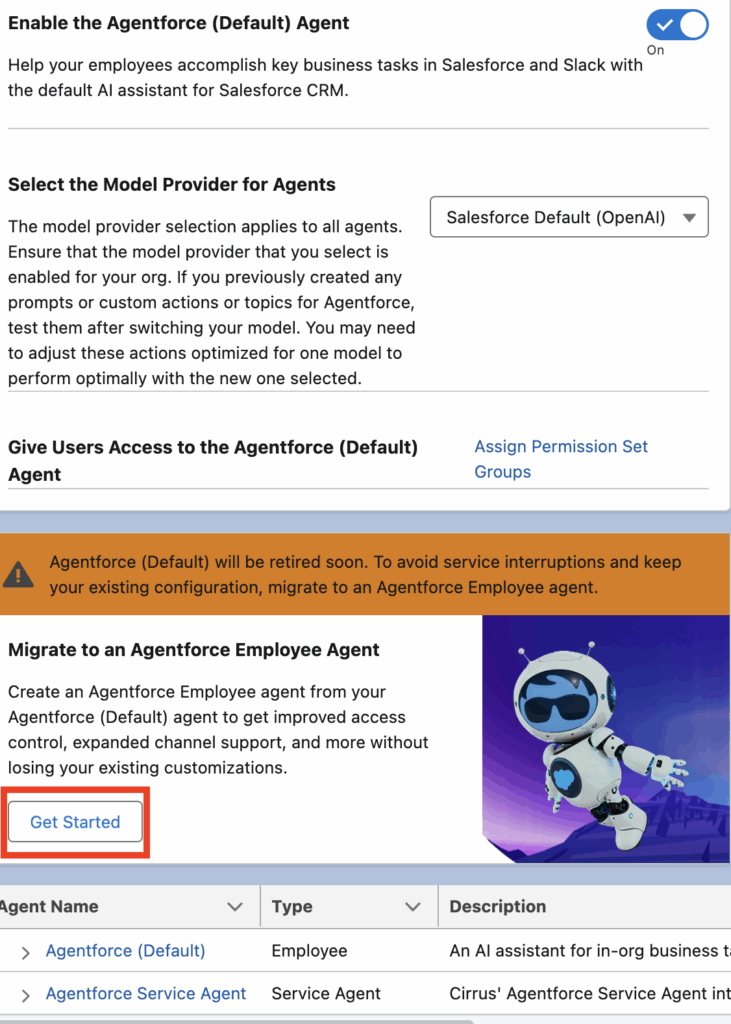
On the Agentforce Agents page, you will see a prominent notification section encouraging you to upgrade.
- Locate the section titled “Migrate to an Agentforce Employee Agent”.
- Click the “Get Started” button to launch the migration wizard.
Step 3: Enter a Name for the New Agent
The wizard will prompt you to name your new Employee Agent.
- Name: Enter a logical and descriptive name. For example, “Corporate Employee Agent” or “Service Cloud Employee Agent”.
- API Name: The API name will be auto-populated based on the name you enter (e.g.,
Corporate_Employee_Agent). You can leave this as is.
This new agent will inherit all the settings, permissions, and configurations from your old Agentforce (Default) agent.
Step 4: Create the Agent
With the name defined, you are ready to proceed.
- Click the “Create” button.
- This action initiates the background process where Salesforce builds the new Employee Agent using the metadata from your existing Default agent.
Step 5: Wait for Completion and Verify
The creation process is typically very fast, often completing in just a few moments.
- The system will process the creation in the background. You can remain on the page until it confirms completion.
- Once finished, you will see your new agent listed in the Agentforce Agents list with the type clearly marked as “Employee”.
- Verification: Click into your newly created Employee Agent to quickly verify that its details and configurations have been successfully copied over from the old Default agent.
What Happens After Migration?
Upon successful creation, the new Agentforce Employee Agent becomes the active, standard agent for your organization. All processes that relied on the default agent will now seamlessly utilize the new Employee Agent, ensuring continuity of service without any disruption.
Frequently Asked Questions (FAQ)
Q1: Will my current Agentforce (Default) agent stop working after June 17, 2025?
A: No, it will continue to function. However, it will not receive any new features, bug fixes, or enhancements, making it a legacy component.
Q2: Is there any downtime required for this migration?
A: No, the creation of the new agent happens in the background. The transition is seamless, and no downtime is required.
Q3: What specific data or settings are migrated?
A: Salesforce is designed to copy all the relevant configurations, including permissions and connected apps, from the Default agent to the new Employee Agent to ensure functional parity.
Q4: Can I revert back to the Agentforce (Default) agent?
A: The migration creates a new agent; it doesn’t delete the old one. However, reverting is not recommended as the goal is to move to the modern, supported agent type. All efforts should be focused on fully adopting the new Employee Agent.
Conclusion: Act Now for a Future-Ready Salesforce Org
The migration from Salesforce Agentforce (Default) to an Employee Agent is a simple but essential task for proactive Salesforce administrators. By taking a few minutes to complete this wizard-driven process, you ensure your organization remains aligned with Salesforce’s technology roadmap, poised to take advantage of future innovations in agent-based services.
Don’t wait for the June 17, 2025 deadline to become a factor. Follow the steps outlined above to migrate today and keep your Salesforce environment modern, secure, and fully supported.
Salesforce Articles:
https://help.salesforce.com/s/articleView?id=ai.agent_default_considerations.htm&type=5
https://help.salesforce.com/s/articleView?id=ai.migrate_agentforce_default_to_aea.htm&type=5