AI interactions in Slack are protected by Slack AI guardrails, an enterprise-grade safety and security framework. It provides layered protection across every prompt and response, combining foundational safeguards with real-time defenses to support secure and responsible AI use at scale.
The Slack AI Guardrails provide a multi-layered security framework for Slack related AI features, including Slackbot, that uphold data privacy and mitigate risks of misuse.
What gets sent to LLM
Slackbot runs within Slack’s trusted boundary (in Slack’s VPC), and “LLM providers do not have access to customer data,” plus your data isn’t used to train LLMs; it also respects existing workspace/app permissions. Details can be found in the Slackbot AI agent documentation.
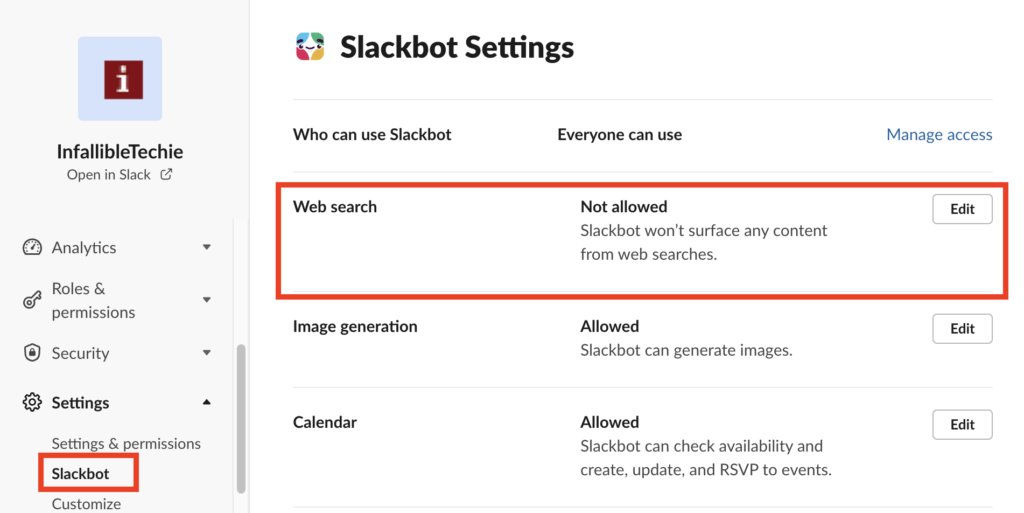
Web search is off by default. Owners and admins enable it. The path is Admin → Workspace settings → Slackbot. On Enterprise Grid it is under Org settings → Slackbot.
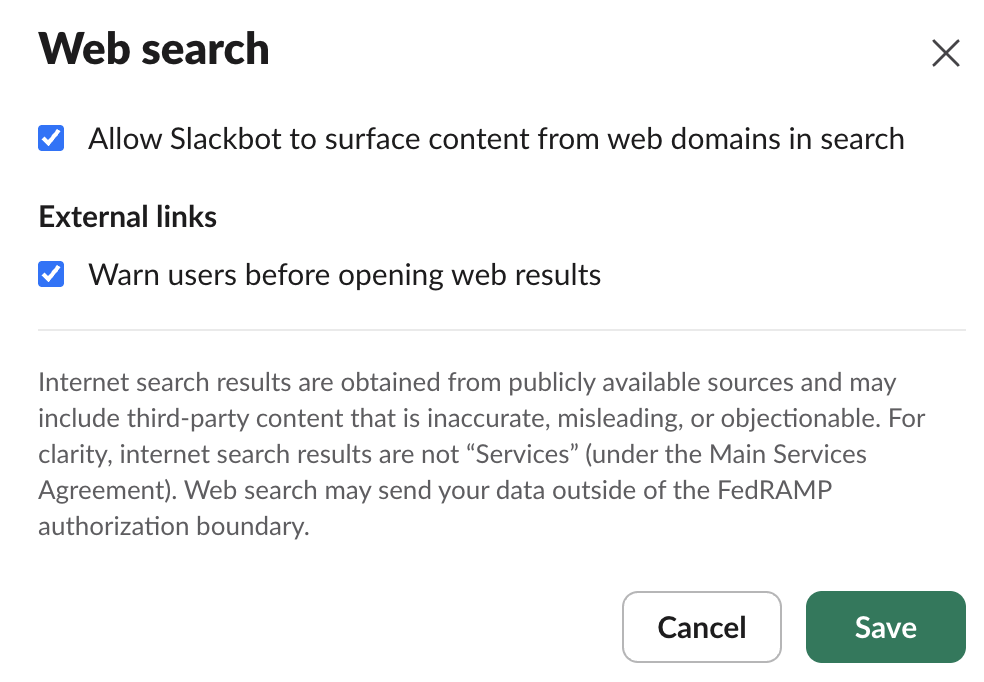
Web search may send your data outside of the FedRAMP (Federal Risk and Authorization Management Program) authorization boundary. This matters if the company is regulated or government-adjacent.
Architectural Trust Framework
When Slackbot performs a web search, it operates under strict privacy protections:
- No LLM Training: Customer data, queries, and generated search summaries are never used to train public or proprietary underlying large language models.
- Ephemeral Processing: Web search queries and retrieved answer summaries are processed in a secure environment and discarded immediately without persistent storage.
- User-Scoped Access: Slackbot strictly respects existing internal enterprise permissions. It will only reference workspace information that the specific requesting user already has authorization to view.
Core Governance Risks & Mitigations
| Governance Risk | Technical Impact | Policy Recommendation |
| Data Leakage Outside Compliant Perimeters | Web search functions route traffic externally, which sends data outside the FedRAMP authorization boundary. | Disable web search in workspaces containing Controlled Unclassified Information (CUI), federal data, or strict CMMC/HIPAA environments. |
| Phishing & Malicious Links | Slackbot may cite and surface public URLs that lead to unverified or compromised external websites. | Enable the “Warn users before opening cited links” toggle in Admin settings. |
| Intellectual Property Exposure | Users may accidentally paste sensitive corporate intellectual property into a prompt that Slackbot utilizes to query the web. | Update your Acceptable Use Policy explicitly instructing users never to include source code, trade secrets, or PII in AI prompts. |
Steps to Enable Web Search for Slackbot
- From your Slack desktop App, select Admin in the sidebar.
- Select Workspace settings from the menu, then click Settings.
- Select or Click Slackbot.
- Next to Web search, click Edit.
- Check the box next to Allow Slackbot to surface content from web domains in search to turn web search on.
- Click Save.
We can warn users using the “Warn users before opening web results” option to display a warning each time someone clicks on a link to view it outside of Slack.
References
Guide to the Slack AI Guardrails
Security for AI Features in Slack