Learn how to track After Conversation Work (ACW) reporting metrics in Salesforce. A technical guide for Admins, Developers, and Architects on configuring Agent Work reports.
How to Track After Conversation Work (ACW) Reporting Metrics in Salesforce
For Salesforce teams leveraging Omni-Channel, measuring agent efficiency goes far beyond simply logging active call or chat durations. A critical, yet often overlooked, component of Average Handle Time (AHT) is the wrap-up period.
Tracking After Conversation Work (ACW) is a great way to measure your agents’ true handle times and see how much time is spent on wrap-up tasks like logging notes or updating records.
Whether you are a Salesforce Administrator, Developer, Analyst, or Architect, configuring precise ACW metrics is essential for accurate capacity planning, workforce management, and identifying bottlenecks in your service console UI. This guide will walk you through the core technical steps to expose and analyze this data.
The Architecture of ACW in Salesforce
In Salesforce Omni-Channel, when an agent finishes interacting with a customer (e.g., ending a Voice call or closing a Messaging session), they often enter a wrap-up state. During this time, they are still consuming capacity.
At the database level, Salesforce tracks this routing and capacity lifecycle within the AgentWork object. This object acts as the junction between the agent’s presence, the routed work item (e.g., Case, Lead, VoiceCall), and the service channel. To extract ACW metrics, we must build our reporting architecture directly on top of this object.
Core Implementation Steps
To surface these metrics to your operational leaders, you need to configure the data model to allow for native reporting.
Here are the fundamental implementation steps:
1. Create a Custom Report Type on Agent Work object.
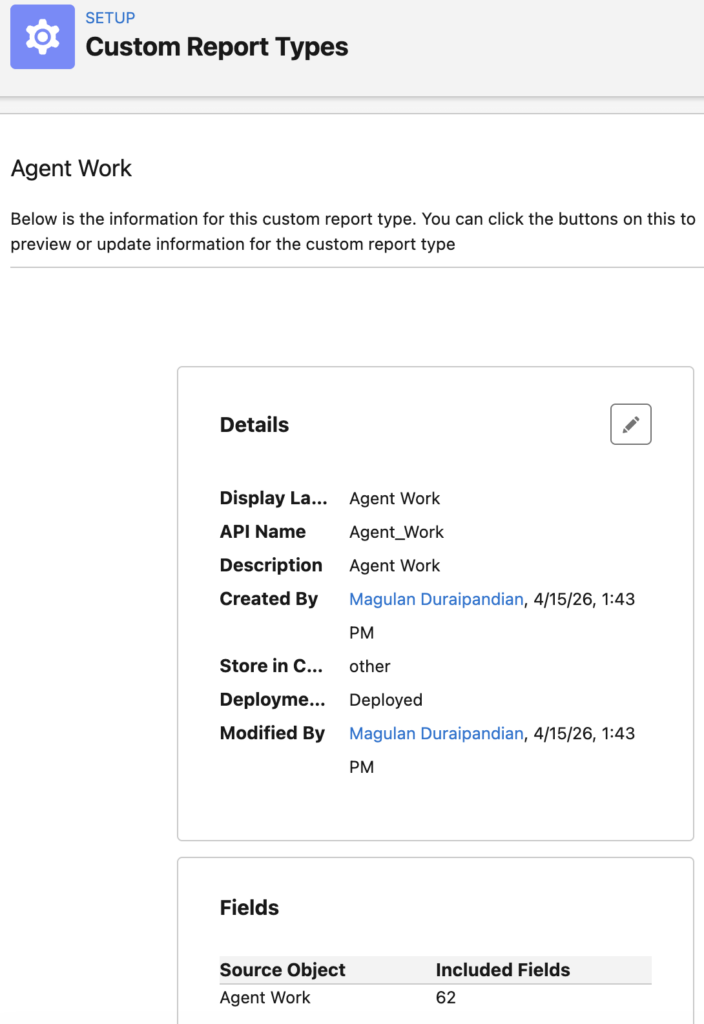
2. Run a Report on the newly created Report Type for tracking After Conversation Work (ACW).
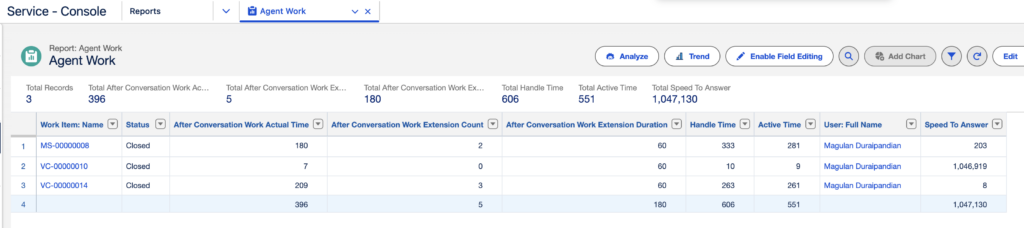
By creating this custom report type, you unlock access to crucial back-end fields that calculate the exact duration an agent spends in the ACW state before closing the tab or explicitly marking the work as complete.
Key Technical Fields to Include
When you build your Custom Report Type (CRT) on the AgentWork object, ensure that your layout includes the following fields for your Analysts and Admins to utilize:
SpeedToAnswer: The time it took for the agent to accept the routed work.HandleTime: The total time the agent spent on the work item (Active Time + ACW).ActiveTime: The time the agent spent actively engaged with the customer.AfterConversationActualTime: The exact time in seconds spent in the wrap-up state. (Note: Depending on your Salesforce release and channel, this may also be calculated via custom formula fields comparingAcceptDateTime,DeclineDateTime, andCloseDateTime).