Salesforce SOAP API login() is Retiring: Your Essential Guide to Migration and Testing
The digital landscape is constantly evolving, and a major theme is enhanced security and modernization. Salesforce is taking a significant step in this direction with the planned retirement of the SOAP API login() call for authentication.
If your organization has integrations that rely on this method, it’s crucial to understand the implications, identify affected systems, and begin your migration path to a more secure alternative, like OAuth 2.0 flows and External Client Apps.
What is Happening to SOAP API login()?
The SOAP API login() SOAP API call allows a client application to authenticate to Salesforce using just a username and password (plus a security token if the IP is not whitelisted). While convenient, this method offers less granular security control compared to modern authentication frameworks like OAuth.
Salesforce is retiring this method to align with connected app security features and promote the use of OAuth-based authentication flows, which are the industry standard for secure API access and provide greater control through connected apps.
The SOAP API login() call is no longer available in the newest API versions (65.0 and later) and will be fully retired for all existing versions in an upcoming major release (currently planned for Summer ’27 for API versions 31 to 64 inclusive).
Identifying the Impacted Integrations
A critical first step is to audit your Salesforce environment to find where the SOAP login() method is in use. Components that often use this include:
- Custom-built applications, middleware, or ETL tools.
- Third-party connectors (check with your vendors for updated versions).
- Any client that authenticates via a simple username/password/token combination directly through the SOAP API.
Actionable Tip: You can use Event Monitoring to identify applications making SOAP API login() calls.
The Path Forward: Migrate to OAuth 2.0 Flows
Salesforce strongly recommends migrating any applications using SOAP API login() to use modern OAuth 2.0 flows with a Connected App or External Client App. This provides better security, control, and governance.
Depending on your integration’s use case, you should consider flows such as:
- OAuth Client Credentials Flow: Ideal for server-to-server integrations where no interactive user is present.
- OAuth Web Server Flow: Suitable for web applications that need to access Salesforce data on behalf of a user.
- OAuth JWT Bearer Token Flow: Recommended for server-to-server integrations where you need to authenticate using a digital signature without manually storing client secrets.
How to Test the SOAP API login() Retirement in Your Org
Salesforce provides a Release Update tool to test the impact of the retirement in a sandbox environment before the official enforcement date. This is an essential step to ensure a smooth transition.
Here is the step-by-step process to enable the test run:
- Go to Salesforce Setup.
- In the Quick Find box, select Release Updates.
- Locate the update titled “SOAP API login() Retirement”.
- Check the “Assess the impact of this release update” section for details.
- Click the Done button.
- Click “Enable Test Run” to begin testing the retirement and see how your integrations will behave.
- If you encounter issues and need to revert, you can click “Disable Test Run” to roll back the change immediately.
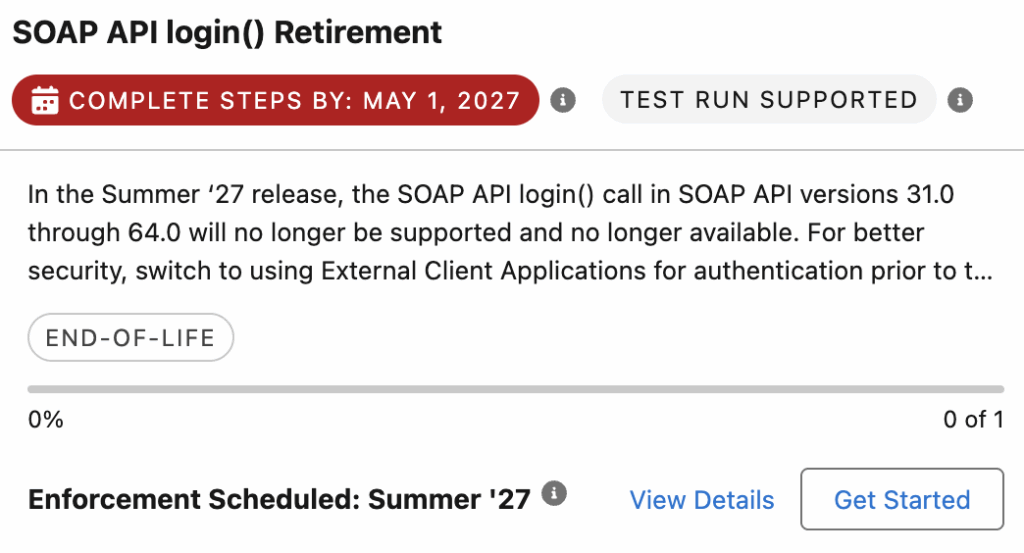
Note: The platform-level setting “Enable SOAP API login()” under User Interface in Setup cannot be disabled once enabled. The Release Update is the only way to test the impact of this retirement on your org.
You can also make use of Transaction Security Policy to block the SOAP Requests.
Salesforce Article:
https://help.salesforce.com/s/articleView?id=005132110&type=1