As Salesforce environments mature, security requirements often dictate that we move away from legacy protocols. While SOAP API has been a staple of Salesforce integration for years, many organizations are now enforcing REST API standards or simply need to restrict specific users (like Service Accounts or temporary vendors) from utilizing older connection methods.
But how do you block SOAP access for just one user without affecting the rest of the organization?
The answer lies in Salesforce Transaction Security Policies. In this guide, we will walk you through how to configure a policy to detect and block SOAP API login attempts for a specific user.
Why Block SOAP API?
Before we dive into the “How,” it is important to understand the “Why.” You might want to implement this restriction to:
- Enforce Modern Standards: Encourage developers and vendors to use REST API.
- Security Compliance: Limit the surface area of attack by restricting protocols for specific high-risk users.
- Deprecation Management: Slowly phase out SOAP usage by blocking it user-by-user.
Prerequisites
- Salesforce Shield or Event Monitoring license (required for Transaction Security Policies).
- System Administrator permissions.
Step-by-Step Guide: Blocking SOAP Requests
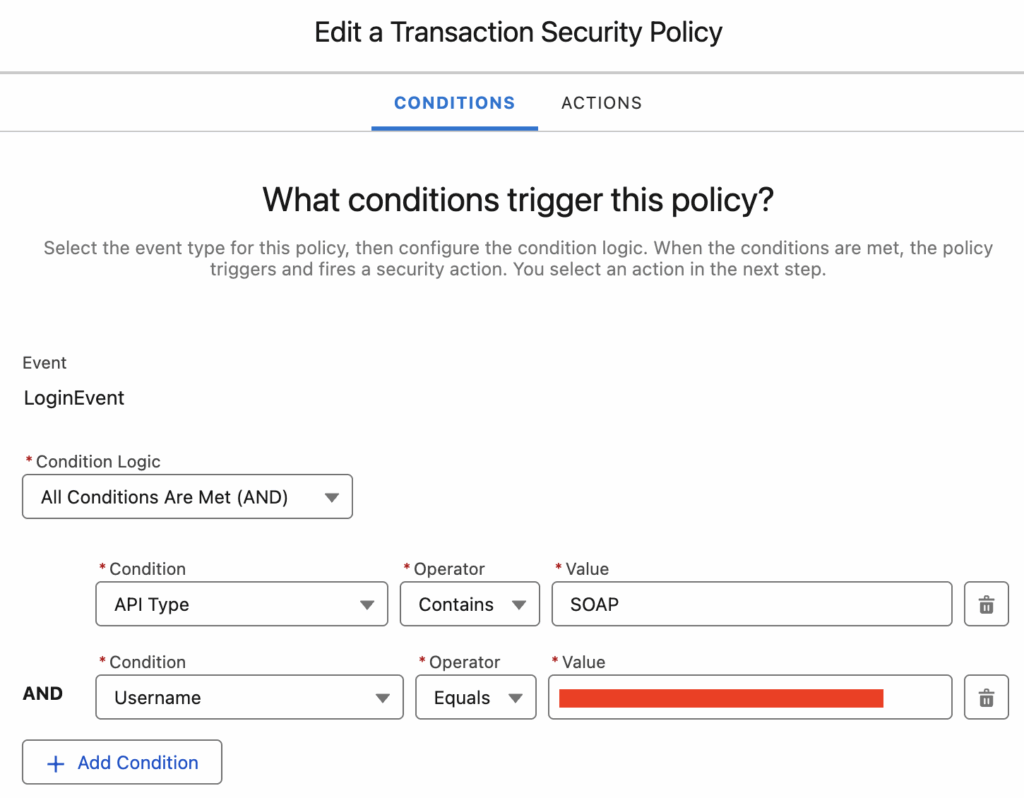
We will utilize the LoginEvent within Transaction Security Policies. This allows us to intercept the login process specifically when the API type matches “SOAP” and the username matches our target.
1. Navigate to Transaction Security Policies
Start by logging into your Salesforce instance.
- Click the Gear Icon and select Setup.
- In the Quick Find box, type Transaction Security.
- Select Transaction Security Policies.
2. Create a New Policy
- Click the New button to start the creation wizard.
- Select Condition Builder (if asked between Apex and Builder) for a declarative approach.
3. Choose the Event
Salesforce monitors various events. Since SOAP API starts with a handshake/login, we want to catch it there.
- Event: Select LoginEvent.
4. Define the Conditions
This is the logic that determines who gets blocked and when. We need to set two conditions that must both be true.
- Condition 1 (The Protocol):
- Field:
API Type(orLogin Typedepending on your API version) - Operator:
Contains - Value:
SOAP
- Field:
- Condition 2 (The User):
- Field:
Username - Operator:
Equals - Value:
name@yourdomain.com(Enter the actual username of the user you wish to restrict)
- Field:
Note: Ensure logic is set to All Conditions Are Met (AND) so you don’t accidentally block all SOAP traffic for the whole company!
5. Set the Action
Now that we have identified the “Crime,” we need to determine the punishment.
- Action: Select Block.
- Notification: It is best practice to select a recipient (usually yourself or a security admin) to receive an email whenever this block is triggered. This helps with auditing.
6. Save and Activate
- Give your policy a meaningful name, such as
Block_SOAP_For_Vendor. - Set the status to Enabled.
- Click Finish or Save.
Testing the Policy
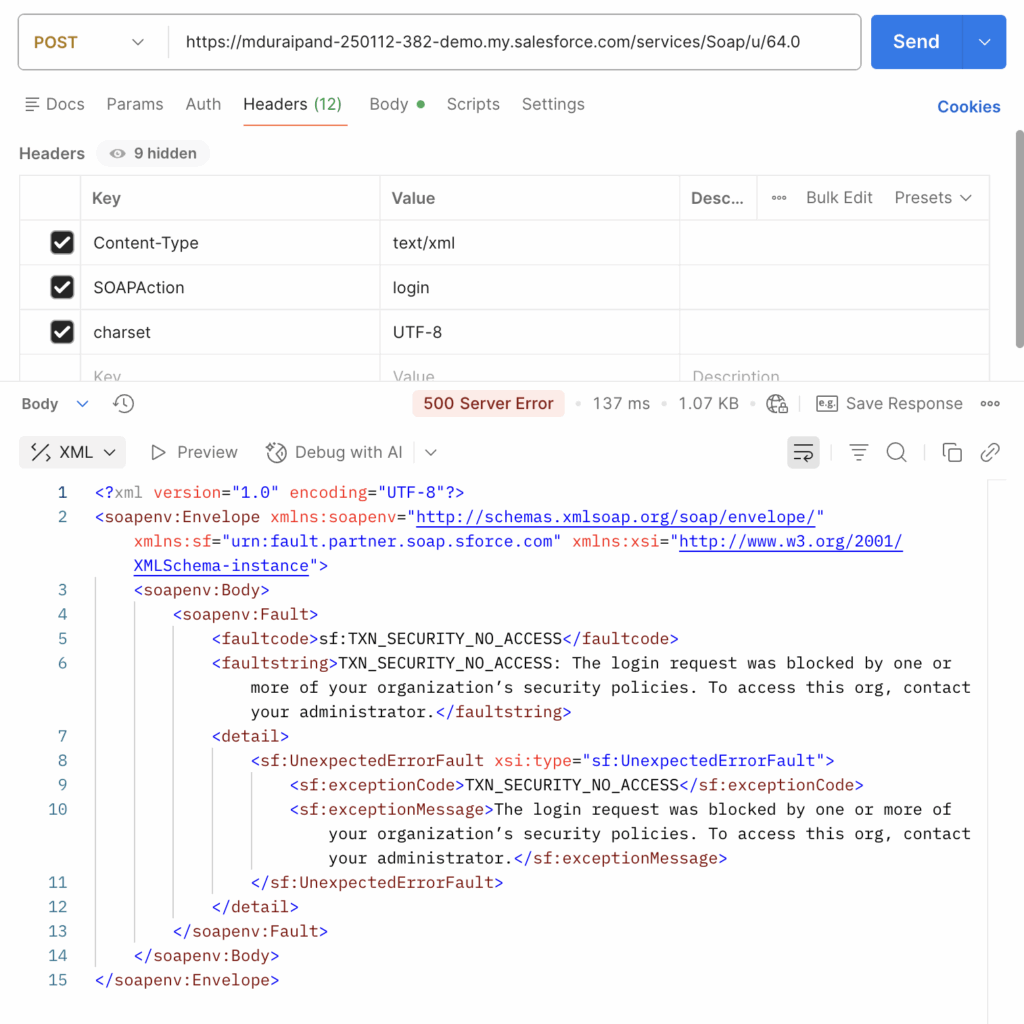
Once the policy is active, it takes effect immediately. To test this:
- Open a tool like SoapUI or Postman (configured for SOAP).
- Attempt to log in using the credentials of the restricted user.
- The login attempt should fail.
Conclusion
Using Transaction Security Policies allows Salesforce Admins to exert granular control over how data is accessed. By targeting the LoginEvent, you can effectively “turn off” SOAP API access for specific users without writing a single line of code.