Here is a structured, SEO-optimized blog post tailored for a technical audience, adhering to your constraints and formatting requirements.
Proposed SEO Title
Mastering Salesforce GenAI: How to Invoke Prompt Templates using Apex
- Alternative: A Developer’s Guide to Triggering Einstein Prompt Templates via Salesforce Connect API
- Target Keywords: Salesforce Prompt Template, Apex, ConnectApi, Einstein GenAI, Flex Prompt Template, Salesforce Developer, Prompt Builder.
Introduction
The introduction of Einstein Prompt Builder has revolutionized how Salesforce Administrators and Architects design generative AI capabilities. However, the true power of these prompts is unlocked when they are automated. While flows are excellent for declarative automation, there are complex scenarios where developers need granular control.
For Salesforce Developers and Architects, the ability to invoke a Prompt Template programmatically using Apex is a game-changer. It allows for deep integration into existing service layers, triggers, or custom LWC controllers.
In this guide, we will walk through how to leverage the Salesforce Connect API to invoke a Flex Prompt Template using Apex, specifically focusing on a customer support use case.
The Use Case: Automated Case Summarization
Imagine a scenario where a generic support representative needs a concise summary of a long-running customer Case. Instead of reading through every comment, we want to use GenAI to summarize the interaction.
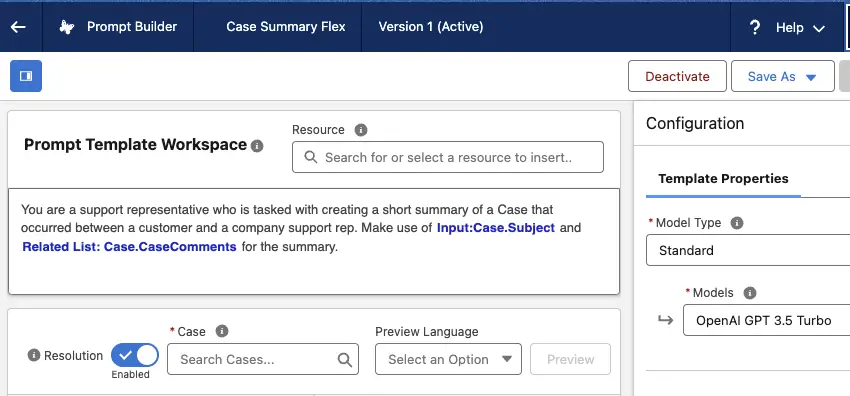
For this example, we have configured a Flex Prompt Template in Salesforce.
The Prompt Template Content:
You are a support representative who is tasked with creating a short summary of a Case that occurred between a customer and a company support rep. Make use of
{!$Input:Case.Subject}and{!$RelatedList:Case.CaseComments.Records}for the summary.
Key Technical Details:
- Template Type: Flex Prompt Template
- API Name:
Case_Summary_Flex - Inputs: Requires a Case Object input (
Input:Case).
Invoking the Template with Apex
To trigger this prompt programmatically, we utilize the ConnectApi namespace (specifically ConnectApi.EinsteinLLM). This allows us to construct the necessary inputs, pass the record context, and retrieve the generated response.
Below is the implementation code.
Note: The following snippet demonstrates the raw construction of the request, including wrapping the input parameters and handling the generation request.
String objCaseId = '500Hn00001j4ulUIAQ';
Map < String, String > objCaseMap = new Map < String, String >();
//Passing Case Id since the Input object is Case
objCaseMap.put( 'id', objCaseId );
ConnectApi.WrappedValue objCaseValue = new ConnectApi.WrappedValue();
objCaseValue.value = objCaseMap;
Map < String, ConnectApi.WrappedValue > inputParamsMap = new Map < String, ConnectApi.WrappedValue >();
//Case is the API Name of the input
inputParamsMap.put( 'Input:Case', objCaseValue );

ConnectApi.EinsteinPromptTemplateGenerationsInput executeTemplateInput = new ConnectApi.EinsteinPromptTemplateGenerationsInput();
executeTemplateInput.additionalConfig = new ConnectApi.EinsteinLlmAdditionalConfigInput();
executeTemplateInput.additionalConfig.applicationName = 'PromptBuilderPreview';
executeTemplateInput.isPreview = false;
executeTemplateInput.inputParams = inputParamsMap;

//Case_Summary_Flex is the API Name of the Prompt Template
ConnectApi.EinsteinPromptTemplateGenerationsRepresentation generationsOutput = ConnectApi.EinsteinLLM.generateMessagesForPromptTemplate(
    'Case_Summary_Flex',
    executeTemplateInput
);

ConnectApi.EinsteinLLMGenerationItemOutput response = generationsOutput.generations[0];
String strResponse = response.text;
System.debug(
    'Response is ' +
    strResponse
);
Code Breakdown
For the Software Engineers and Analysts reviewing this implementation, here is what is happening under the hood:
- Input Mapping (
objCaseMap): The Prompt Builder requires context. We cannot simply pass a raw ID string; we must pass a Map containing theidkey. - WrappedValue (
ConnectApi.WrappedValue): The Connect API requires inputs to be “wrapped.” This universal wrapper allows Salesforce to handle various data types (SObjects, Lists, Primitives) uniformly. - Input Parameters (
inputParamsMap): This map links the API Name of the input defined in Prompt Builder (Input:Case) to the actual data we wrapped in step 2. - Configuration (
additionalConfig): We define the application context. Note the usage ofPromptBuilderPreviewwhich is often used during the development and testing phase. - Generation (
ConnectApi.EinsteinLLM): Finally, we call thegenerateMessagesForPromptTemplatemethod. This sends the instruction to the Trust Layer and the LLM, returning thegenerationsOutput.
Conclusion
Invoking Prompt Templates via Apex bridges the gap between declarative AI design and robust enterprise software engineering. By using the ConnectApi, you can embed GenAI summaries directly into your custom applications, ensuring your users have the right data at the right time.