Resolving the “Provide additional info to proceed” Error in Salesforce Messaging for In-App
If you are a Salesforce Admin, Developer, or Architect implementing Enhanced Chat formerly known as Messaging for In-App and Web (MIAW), you know that configuring the pre-chat experience is critical for routing and context. However, a seemingly minor setting can sometimes trigger a frustrating roadblock for your users.
One of the most common issues technical teams encounter during testing or deployment is the “Provide additional info to proceed” exception.
In this post, we will break down exactly why this error occurs and provide the straightforward configuration change required to fix it.
The Core Issue and Fix
As requested, here is the exact exception and the resolution outline:
Exception:
Provide additional info to proceed
Resolution:
Use “Every Conversation” for the Pre-Chat Display Frequency.
If “Every Session” is used for the Pre-Chat Display Frequency, the error is thrown for the Pre-Chat information missing.
Understanding the “Why” Behind the Error
For Developers and Architects troubleshooting this, it helps to understand the underlying mechanics of Salesforce’s messaging infrastructure.
When you configure a pre-chat form, it collects hidden or user-inputted data (like First Name, Last Name, Email, or custom parameters) to pass along to the Omni-Channel flow. The Pre-Chat Display Frequency dictates how often the user is prompted to provide this payload.
- Every Session: The system caches the pre-chat completion state for the duration of the browser or app session. If a user starts a new conversation within that same active session, the system attempts to bypass the pre-chat form. However, if the Omni-Channel flow strictly requires that pre-chat data payload to initiate the routing, the system recognizes that the required information is missing from the immediate request, resulting in the
Provide additional info to proceedexception. - Every Conversation: By forcing the display frequency to “Every Conversation,” you guarantee that the required pre-chat payload is freshly collected and passed to the Messaging Session object every single time a chat is initiated, successfully satisfying the backend requirements.
Recommendations & Best Practices
To ensure a seamless implementation of Messaging for In-App and Web, keep these best practices in mind when configuring your pre-chat settings:
- Align Display Frequency with Flow Requirements: If your Omni-Channel routing logic heavily depends on pre-chat parameters (e.g., routing by Contact ID or custom context variables), always default to “Every Conversation”. This prevents data loss between the client and the routing flow.
- Test in Isolated Environments: When testing pre-chat behaviors, always use incognito/private browser windows or clear your application cache. Testing in a standard browser window can cause false positives due to cached session tokens, masking the “Every Session” error until real users encounter it.
- Validate Parameter Mapping: Ensure that every field collected in the pre-chat form is accurately mapped to the corresponding fields on the Messaging Session record. Unmapped required fields can sometimes throw similar generic missing-info exceptions.
- Keep Pre-Chat Friction Low: Since you are requiring the form to appear for “Every Conversation,” ensure the form is as lightweight as possible. Use hidden pre-chat fields to pass system data (like app version or logged-in User ID) automatically, minimizing the manual data entry required from your users.
Exception:
Provide additional info to proceedResolution:
Use “Every Conversation” for the Pre-Chat Display Frequency.
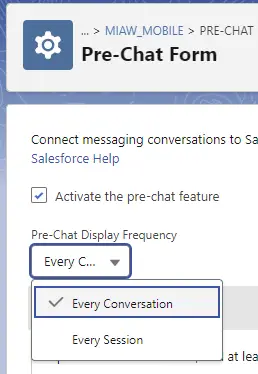
If “Every Session” is used for the Pre-Chat Display Frequency, the error is thrown for the Pre-Chat information missing.